Install the Webserver-Front (DMZ)
The Webserver-Front is a read-only replica of the Webserver (ADMIN) designed to be exposed in a DMZ. It is fed exclusively by a one-way, mutually-authenticated (mTLS) push from ADMIN: the Front never opens a connection back to ADMIN or to any internal component. This page takes you from nothing to a working replication feed: generate the certificates and keys, copy them to each host, configure both sides and verify.
Throughout this page, ADMIN is the normal (licensed, internal) Webserver and FRONT is the Webserver-Front. For the architecture and trust model, see Webserver-Front (DMZ Replica); for day-to-day operation, see Operating Webserver-Front.
Security recap
- ADMIN → FRONT only. ADMIN pushes incremental deltas continuously and a full snapshot every
FrontReconcileMinsminutes to FRONT’s replication receiver (mTLS, on FRONT’sPortAPI). - Three independent protections wrap every push: mTLS client-certificate authentication, a short-lived RS256 token (dedicated signing keypair), and AES-256-GCM payload encryption with the shared
ReplKey. - Secrets never leave ADMIN. Only a whitelist of buckets is replicated, and sensitive fields (tokens, passwords, internal IPs/ports/endpoints) are stripped before leaving ADMIN.
- No license needed on FRONT. It runs without a
license_MNS.datfile.
Before you start: your values
Only the values below change from one environment to another. Everything else on this page is copied and run as-is.
| Value | What to put | Example (replace it!) |
|---|---|---|
| FRONT DNS name(s) | Every hostname used to reach FRONT: the one ADMIN dials and the one users type in their browser | front.acme.local, status.acme.com |
| FRONT IP address(es) | Every IP address used to reach FRONT, if any (ADMIN or users dialing an IP) | 10.20.0.15 |
FRONT PortAPI |
Replication port ADMIN pushes to (default) | 8040 |
FRONT PortWEB |
Web UI port users open (default) | 9080 |
The SAN values are examples: replace them
front.acme.local, status.acme.com and 10.20.0.15 are placeholders. Use the real DNS names and IP addresses of your FRONT host. The certificate is only accepted for the names and addresses listed in its SAN (Subject Alternative Name):
- ADMIN refuses to push if the host in
FrontEndpointis not in the SAN (the CN alone does not count). - FRONT serves the same certificate on
PortAPI(replication) and onPortWEB(users’ browsers), so the SAN must also contain the name users type in their browser.
When in doubt, list every DNS name and every IP address of the FRONT host. Adding entries later means re-issuing the certificate.
Where to run what:
| Machine | Steps | Needs |
|---|---|---|
| A trusted workstation (ideally offline) | Step 1 | bash + OpenSSL: any Linux, macOS, or Git Bash on Windows (Git for Windows ships OpenSSL) |
| FRONT host (DMZ) | Step 2 | the front/ folder produced by step 1 |
| ADMIN host | Steps 3 and 4 | the admin/ folder produced by step 1 |
Step 1 — Generate the certificates and keys
Option A — Script (recommended)
Download mugnsoft-front-pki.sh and run it in bash (on Windows: open Git Bash in the download folder). Replace the --dns and --ip values with yours; separate several values with commas, without spaces:
bash mugnsoft-front-pki.sh --dns front.acme.local,status.acme.com --ip 10.20.0.15
--ip can be omitted if FRONT is only reached by DNS name. The script refuses to run with the documentation’s example values (example.com, 203.0.113.10), refuses to overwrite an existing output folder, generates everything, checks it, and prints:
5/5 Self-check
  ok  ADMIN client cert is signed by the CA
  ok  ADMIN client cert is valid for client authentication
  ok  FRONT server cert is signed by the CA and valid for server authentication
  ok  ADMIN client key matches its certificate
  ok  FRONT server key matches its certificate
  ok  repl_sign.pub is the public half of repl_sign.key
  SAN of the FRONT certificate:
      DNS:front.acme.local, DNS:status.acme.com, IP Address:10.20.0.15
Check that the SAN line lists your names and addresses. The result is one folder per destination, already laid out like the install directories:
mugnsoft-front-pki/
├── ca/                                  KEEP OFFLINE - copy to no server
│   ├── repl_ca.key                      CA private key
│   └── repl_ca.crt
├── admin/                               -> copy the contents into the ADMIN install directory
│   ├── pki/repl_ca.crt
│   ├── pki/admin_client.crt
│   ├── pki/admin_client.key
│   ├── pki/repl_sign.key
│   └── webserver.json.add               lines to add to ADMIN's webserver.json (ReplKey filled in)
└── front/                               -> copy the contents into the FRONT install directory
    ├── pki/repl_ca.crt
    ├── pki/repl_sign.pub
    ├── config/ssl/certificates/webserver.pem    FRONT server certificate
    ├── config/ssl/private/webserver.key         FRONT server key
    └── webserver-front.json             complete FRONT configuration (ReplKey filled in)
Options: --out <folder> (default ./mugnsoft-front-pki), --days <n> validity of the ADMIN and FRONT certificates (default 825; the CA is valid 10 years). --help prints the usage.
Save this as mugnsoft-front-pki.sh:
#!/usr/bin/env bash
# mugnsoft-front-pki.sh - generate every key and certificate the Webserver (ADMIN)
# and the Webserver-Front (FRONT) need for replication, sorted into one folder per
# host, ready to copy into each install directory.
#
# Requires bash and OpenSSL 1.1.1 or later (Linux, macOS, or Git Bash on Windows).
#
# Usage:
#   ./mugnsoft-front-pki.sh --dns <front-names> --ip <front-ips> [--out <dir>] [--days <n>]
#
#   --dns   Comma-separated DNS names of the FRONT host: the name ADMIN dials
#           (FrontEndpoint) AND the name users type in their browser.
#   --ip    Comma-separated IP addresses of the FRONT host, if ADMIN or users
#           reach it by IP. Optional when --dns is given.
#   --out   Output folder (default: ./mugnsoft-front-pki). Must not exist yet.
#   --days  Validity of the ADMIN client and FRONT server certificates (default 825).
#
# Example (replace the values with YOUR environment's names and addresses):
#   ./mugnsoft-front-pki.sh --dns front.acme.local,status.acme.com --ip 10.20.0.15

set -euo pipefail
# Git Bash: keep "/CN=..." from being rewritten into a Windows path.
export MSYS_NO_PATHCONV=1 MSYS2_ARG_CONV_EXCL='*'

DNS="" IPS="" OUT="./mugnsoft-front-pki" DAYS=825
die() { echo "ERROR: $*" >&2; exit 1; }
usage() { sed -n '2,21p' "$0" | sed 's/^# \{0,1\}//'; exit "${1:-0}"; }

while [ $# -gt 0 ]; do
  case "$1" in
    --dns)  DNS="${2:-}"; shift 2 ;;
    --ip)   IPS="${2:-}"; shift 2 ;;
    --out)  OUT="${2:-}"; shift 2 ;;
    --days) DAYS="${2:-}"; shift 2 ;;
    -h|--help) usage 0 ;;
    *) echo "Unknown option: $1" >&2; usage 1 ;;
  esac
done

command -v openssl >/dev/null || die "openssl not found in PATH"
[ -n "$DNS$IPS" ] || die "give at least one --dns or --ip for the FRONT host (see --help)"
# exact match per entry: the placeholders shown on the doc page and in --help
case ",${DNS// /},${IPS// /}," in
  *,front.acme.local,*|*,status.acme.com,*|*,10.20.0.15,*|*example.com*|*203.0.113.10*) die "the example values must be replaced with your FRONT host's real names/addresses" ;;
esac
[[ "$DAYS" =~ ^[0-9]+$ ]] || die "--days must be a number"
[ -e "$OUT" ] && die "$OUT already exists - choose another --out or move it away (it holds your CA key)"

# Build the subjectAltName list and validate every entry.
SAN="" CN=""
IFS=',' read -ra items <<< "$DNS"
for d in "${items[@]}"; do
  d="${d// /}"; [ -z "$d" ] && continue
  [[ "$d" =~ ^[A-Za-z0-9*]([A-Za-z0-9.-]*[A-Za-z0-9])?$ ]] || die "invalid DNS name: $d"
  SAN="${SAN:+$SAN,}DNS:$d"; CN="${CN:-$d}"
done
IFS=',' read -ra items <<< "$IPS"
for ip in "${items[@]}"; do
  ip="${ip// /}"; [ -z "$ip" ] && continue
  [[ "$ip" =~ ^[0-9]{1,3}(\.[0-9]{1,3}){3}$ || "$ip" =~ ^[0-9A-Fa-f:]+$ ]] || die "invalid IP address: $ip"
  SAN="${SAN:+$SAN,}IP:$ip"; CN="${CN:-$ip}"
done

umask 077
mkdir -p "$OUT"/{ca,tmp} "$OUT"/admin/pki "$OUT"/front/pki "$OUT"/front/config/ssl/certificates "$OUT"/front/config/ssl/private
cd "$OUT"
q() { local err; err=$("$@" 2>&1 >/dev/null) || { echo "FAILED: $*" >&2; echo "$err" >&2; exit 1; }; }

echo "1/5 Replication CA"
cat > tmp/ca.cnf <<'EOF'
[req]
distinguished_name = dn
x509_extensions = v3_ca
prompt = no
[dn]
CN = mugnsoft-repl-ca
[v3_ca]
basicConstraints = critical,CA:TRUE
keyUsage = critical,keyCertSign,cRLSign
subjectKeyIdentifier = hash
EOF
q openssl genrsa -out ca/repl_ca.key 4096
q openssl req -x509 -new -key ca/repl_ca.key -sha256 -days 3650 -config tmp/ca.cnf -out ca/repl_ca.crt

echo "2/5 ADMIN client certificate"
cat > tmp/client.ext <<'EOF'
basicConstraints = CA:FALSE
keyUsage = critical,digitalSignature,keyEncipherment
extendedKeyUsage = clientAuth
EOF
q openssl genrsa -out admin/pki/admin_client.key 4096
q openssl req -new -key admin/pki/admin_client.key -subj "/CN=webserver-admin" -out tmp/admin_client.csr
q openssl x509 -req -in tmp/admin_client.csr -CA ca/repl_ca.crt -CAkey ca/repl_ca.key -CAcreateserial \
  -days "$DAYS" -sha256 -extfile tmp/client.ext -out admin/pki/admin_client.crt

echo "3/5 FRONT server certificate ($SAN)"
printf 'basicConstraints = CA:FALSE\nkeyUsage = critical,digitalSignature,keyEncipherment\nextendedKeyUsage = serverAuth\nsubjectAltName = %s\n' "$SAN" > tmp/server.ext
q openssl genrsa -out front/config/ssl/private/webserver.key 4096
q openssl req -new -key front/config/ssl/private/webserver.key -subj "/CN=$CN" -out tmp/front_server.csr
q openssl x509 -req -in tmp/front_server.csr -CA ca/repl_ca.crt -CAkey ca/repl_ca.key -CAcreateserial \
  -days "$DAYS" -sha256 -extfile tmp/server.ext -out front/config/ssl/certificates/webserver.pem

echo "4/5 Token signing keypair and shared payload key"
q openssl genrsa -out admin/pki/repl_sign.key 2048
q openssl rsa -in admin/pki/repl_sign.key -pubout -out front/pki/repl_sign.pub
REPLKEY=$(openssl rand -hex 32)
cp ca/repl_ca.crt admin/pki/repl_ca.crt
cp ca/repl_ca.crt front/pki/repl_ca.crt
rm -rf tmp ca/repl_ca.srl

# Configuration fragments, ReplKey already filled in.
FIRST_HOST="${DNS%%,*}"; FIRST_HOST="${FIRST_HOST// /}"; [ -z "$FIRST_HOST" ] && FIRST_HOST="${IPS%%,*}"
cat > admin/webserver.json.add <<EOF
  "ReplKey": "$REPLKEY",
  "ReplCACert": "pki/repl_ca.crt",
  "ReplClientCert": "pki/admin_client.crt",
  "ReplClientKey": "pki/admin_client.key",
  "ReplSignKey": "pki/repl_sign.key",
  "FrontEnabled": "true",
  "FrontEndpoint": "$FIRST_HOST:8040",
  "FrontReconcileMins": "5",
  "FrontGracePeriodMins": "0"
EOF
cat > front/webserver-front.json <<EOF
{
    "HTTPS": "true",
    "PortAPI": "8040",
    "PortWEB": "9080",
    "RunUser": "",
    "ReplKey": "$REPLKEY",
    "ReplCACert": "pki/repl_ca.crt",
    "ReplPubKey": "pki/repl_sign.pub"
}
EOF

echo "5/5 Self-check"
ok() { echo "  ok  $*"; }
openssl verify -CAfile ca/repl_ca.crt admin/pki/admin_client.crt >/dev/null && ok "ADMIN client cert is signed by the CA"
openssl verify -CAfile ca/repl_ca.crt -purpose sslclient admin/pki/admin_client.crt >/dev/null && ok "ADMIN client cert is valid for client authentication"
openssl verify -CAfile ca/repl_ca.crt -purpose sslserver front/config/ssl/certificates/webserver.pem >/dev/null && ok "FRONT server cert is signed by the CA and valid for server authentication"
[ "$(openssl x509 -in admin/pki/admin_client.crt -noout -pubkey | openssl pkey -pubin -outform DER | openssl dgst -sha256)" = \
  "$(openssl pkey -in admin/pki/admin_client.key -pubout -outform DER | openssl dgst -sha256)" ] && ok "ADMIN client key matches its certificate"
[ "$(openssl x509 -in front/config/ssl/certificates/webserver.pem -noout -pubkey | openssl pkey -pubin -outform DER | openssl dgst -sha256)" = \
  "$(openssl pkey -in front/config/ssl/private/webserver.key -pubout -outform DER | openssl dgst -sha256)" ] && ok "FRONT server key matches its certificate"
[ "$(openssl pkey -in admin/pki/repl_sign.key -pubout -outform DER | openssl dgst -sha256)" = \
  "$(openssl pkey -pubin -in front/pki/repl_sign.pub -outform DER | openssl dgst -sha256)" ] && ok "repl_sign.pub is the public half of repl_sign.key"
echo "  SAN of the FRONT certificate:"
openssl x509 -in front/config/ssl/certificates/webserver.pem -noout -ext subjectAltName | sed -n '2p' | sed 's/^ */      /'

cat <<EOF

Done. Output in: $(pwd)

  ca/       repl_ca.key + repl_ca.crt   KEEP OFFLINE - copy to no server
  admin/    copy the CONTENTS into the ADMIN install directory
            then merge admin/webserver.json.add into ADMIN's webserver.json
  front/    copy the CONTENTS into the FRONT install directory
            (webserver-front.json is complete; it replaces the starter one)

Set FrontEndpoint to a name or IP from the SAN list above, with FRONT's PortAPI.
EOF
Option B — Manual commands
Same result as the script, for environments where you prefer to run each command yourself. Edit the two FRONT_ lines, then paste the whole block into bash (Git Bash on Windows):
# ----- CHANGE these two lines: your FRONT host's real names and addresses -----
FRONT_SAN="DNS:front.acme.local,DNS:status.acme.com,IP:10.20.0.15"
FRONT_CN="front.acme.local"
# ----- everything below runs as-is -----
export MSYS_NO_PATHCONV=1            # Git Bash: keep "/CN=..." as is
mkdir -p mugnsoft-front-pki && cd mugnsoft-front-pki
mkdir -p ca admin/pki front/pki front/config/ssl/certificates front/config/ssl/private

# 1. Replication CA (valid 10 years)
printf '[req]\ndistinguished_name=dn\nx509_extensions=v3_ca\nprompt=no\n[dn]\nCN=mugnsoft-repl-ca\n[v3_ca]\nbasicConstraints=critical,CA:TRUE\nkeyUsage=critical,keyCertSign,cRLSign\nsubjectKeyIdentifier=hash\n' > ca.cnf
openssl genrsa -out ca/repl_ca.key 4096
openssl req -x509 -new -key ca/repl_ca.key -sha256 -days 3650 -config ca.cnf -out ca/repl_ca.crt

# 2. ADMIN client certificate
openssl genrsa -out admin/pki/admin_client.key 4096
openssl req -new -key admin/pki/admin_client.key -subj "/CN=webserver-admin" -out admin_client.csr
printf 'basicConstraints=CA:FALSE\nkeyUsage=critical,digitalSignature,keyEncipherment\nextendedKeyUsage=clientAuth\n' > client.ext
openssl x509 -req -in admin_client.csr -CA ca/repl_ca.crt -CAkey ca/repl_ca.key -CAcreateserial \
  -days 825 -sha256 -extfile client.ext -out admin/pki/admin_client.crt

# 3. FRONT server certificate (carries your SAN list)
openssl genrsa -out front/config/ssl/private/webserver.key 4096
openssl req -new -key front/config/ssl/private/webserver.key -subj "/CN=$FRONT_CN" -out front_server.csr
printf 'basicConstraints=CA:FALSE\nkeyUsage=critical,digitalSignature,keyEncipherment\nextendedKeyUsage=serverAuth\nsubjectAltName=%s\n' "$FRONT_SAN" > server.ext
openssl x509 -req -in front_server.csr -CA ca/repl_ca.crt -CAkey ca/repl_ca.key -CAcreateserial \
  -days 825 -sha256 -extfile server.ext -out front/config/ssl/certificates/webserver.pem

# 4. Token signing keypair, CA copies, shared payload key
openssl genrsa -out admin/pki/repl_sign.key 2048
openssl rsa -in admin/pki/repl_sign.key -pubout -out front/pki/repl_sign.pub
cp ca/repl_ca.crt admin/pki/ && cp ca/repl_ca.crt front/pki/
rm -f admin_client.csr front_server.csr client.ext server.ext ca.cnf ca/repl_ca.srl
echo "ReplKey: $(openssl rand -hex 32)"

# 5. Check: both lines must end in "OK", then the SAN list must be yours
openssl verify -CAfile ca/repl_ca.crt -purpose sslclient admin/pki/admin_client.crt
openssl verify -CAfile ca/repl_ca.crt -purpose sslserver front/config/ssl/certificates/webserver.pem
openssl x509 -in front/config/ssl/certificates/webserver.pem -noout -ext subjectAltName
Both openssl verify lines must print OK, and the last command must show your SAN list. Write down the ReplKey value: it goes into both configuration files (steps 2 and 3). Then create the two configuration fragments the script would have produced, by hand, from the examples in steps 2 and 3.
Step 2 — Install the Front (DMZ host)
Copy the certificate BEFORE the first start
install and start need config/ssl/certificates/webserver.pem to be in place. Current builds stop with Webserver-Front: ...webserver.pem is missing. ReplCACert is set, so Front will not generate a self-signed certificate...: copy front/config/ and run the command again. Earlier builds silently created a self-signed certificate (valid only for webserver.mugnsoft.com and webserver) that ADMIN refuses: copy the files below over it (overwrite) and restart FRONT.
webserver-front uninstall deletes config/ (and dbs/, data/, log/, report/, export/), so it removes the certificate and key copied in step 2.2. pki/ and webserver-front.json are kept. After an uninstall, copy front/config/ again before the next install.
2.1 Extract mugnsoft-webserver-front-<version>.windows-amd64.zip (or .linux-amd64.tar.gz) on the DMZ host. It contains webserver-front.exe (webserver-front on Linux), a starter webserver-front.json and an empty pki/ folder. The web UI is embedded in the binary; no license file is needed.
2.2 Copy the contents of front/ into the FRONT install directory. Transfer the mugnsoft-front-pki/front/ folder to the FRONT host by your usual secure means (scp, SFTP, removable media), then run the command for your OS from the folder that contains front/, with your install path. It adds pki/ and config/ssl/ and replaces the starter webserver-front.json:
# Linux
cp -r front/. /opt/mugnsoft/webserver-front/
# Windows (PowerShell)
Copy-Item -Recurse -Force .\front\* C:\Mugnsoft\webserver-front\
The FRONT install directory now looks like this:
webserver-front/
├── webserver-front.exe              (webserver-front on Linux)
├── webserver-front.json
├── pki/repl_ca.crt
├── pki/repl_sign.pub
└── config/ssl/certificates/webserver.pem
    config/ssl/private/webserver.key
2.3 Check webserver-front.json. The file produced in step 1 is complete; change PortAPI / PortWEB only if you do not use the defaults:
{
    "HTTPS": "true",
    "PortAPI": "8040",
    "PortWEB": "9080",
    "RunUser": "",
    "ReplKey": "<64 hex characters from step 1 - identical on ADMIN>",
    "ReplCACert": "pki/repl_ca.crt",
    "ReplPubKey": "pki/repl_sign.pub"
}
2.4 Install and start the service (from the install directory). Steps 2.1 to 2.4 can also be done in one command with the install script of Install on Linux or Install on Windows: bash mugnsoft-install.sh webserver-front --front-pki ./front (Linux) or .\mugnsoft-install.ps1 webserver-front -FrontPki .\front (Windows).
# Windows (elevated prompt)
webserver-front.exe install && webserver-front.exe start

# Linux (as root)
./webserver-front install && ./webserver-front start
Allow ADMIN to reach FRONT on PortAPI (TCP 8040 by default) through the firewall, and users to reach PortWEB (TCP 9080 by default). FRONT never connects to ADMIN.
Step 3 — Configure ADMIN
3.1 Copy the pki/ folder from admin/ into the ADMIN install directory. Transfer mugnsoft-front-pki/admin/ to the ADMIN host, then run this from the folder that contains admin/, with your install path:
# Linux
cp -r admin/pki /opt/mugnsoft/webserver/
# Windows (PowerShell)
Copy-Item -Recurse -Force .\admin\pki C:\Mugnsoft\webserver\
3.2 Add the replication lines to ADMIN’s webserver.json. Paste the content of admin/webserver.json.add just before the closing }, keep the keys already in the file, and make sure the line before the pasted block ends with a comma. Then set FrontEndpoint to <a DNS name or IP from the SAN>:<FRONT PortAPI>. The result looks like:
{
    "HTTPS": "true",
    "PortAPI": "8050",
    "PortWEB": "9090",
    "RunUser": "",
    "ReplKey": "<same 64 hex characters as on FRONT>",
    "ReplCACert": "pki/repl_ca.crt",
    "ReplClientCert": "pki/admin_client.crt",
    "ReplClientKey": "pki/admin_client.key",
    "ReplSignKey": "pki/repl_sign.key",
    "FrontEnabled": "true",
    "FrontEndpoint": "front.acme.local:8040",
    "FrontReconcileMins": "5",
    "FrontGracePeriodMins": "0"
}
3.3 Restart the ADMIN service (webserver.exe stop then webserver.exe start, or ./webserver stop && ./webserver start on Linux).
Keep the ADMIN and FRONT clocks synchronized (NTP): replication tokens are valid 15 minutes.
Step 4 — Verify
4.1 Test from ADMIN’s web UI. Open the gear menu → components, right-click the webserver and choose edit server. In the General tab, the Webserver-Front block holds FrontEndpoint (Front endpoint API) and the browser URL of FRONT (Front public URL). Click TEST: ADMIN makes the same mTLS call to /uptime as the replication pump, and checks the public URL as a browser would. Both lines must be green:
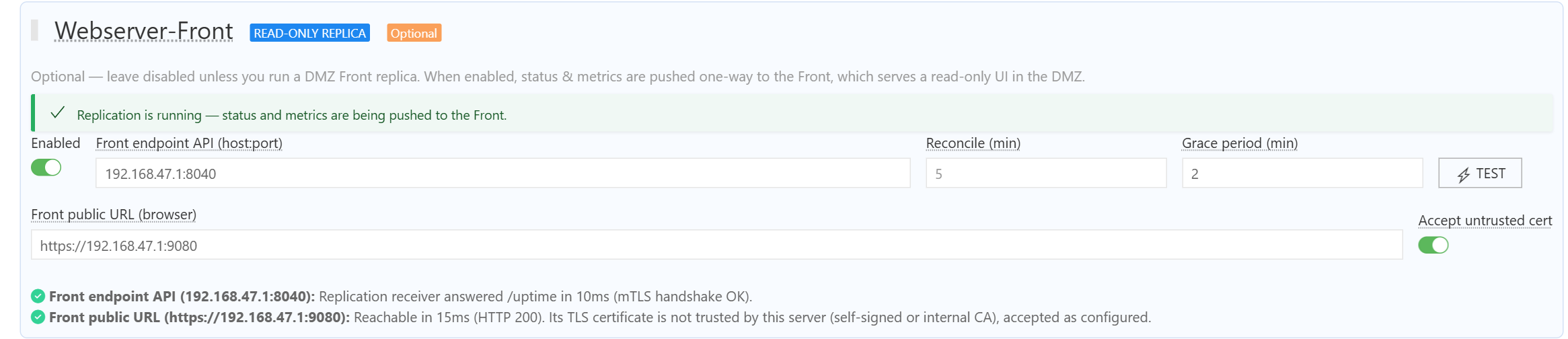
A red Front endpoint API line gives the cause, for example Front is serving its built-in self-signed certificate (CN=webserver): see the troubleshooting table below. The public URL check only warns about a certificate signed by your private CA, unless Accept untrusted cert is on (see Users’ browsers and the certificate).
4.2 Test the channel from the ADMIN host, in the ADMIN install directory, with bash (Git Bash on Windows). Replace front.acme.local and 8040 with your FrontEndpoint host and port:
FRONT_HOST=front.acme.local; FRONT_PORT=8040
printf 'GET /uptime HTTP/1.0\r\n\r\n' | openssl s_client -quiet -connect "$FRONT_HOST:$FRONT_PORT" \
  -verify_hostname "$FRONT_HOST" -verify_return_error \
  -CAfile pki/repl_ca.crt -cert pki/admin_client.crt -key pki/admin_client.key
The last line printed must be ok. This performs exactly the checks ADMIN makes: FRONT’s certificate chain and SAN, and ADMIN’s client certificate. If FrontEndpoint uses an IP address, replace -verify_hostname "$FRONT_HOST" with -verify_ip "$FRONT_HOST".
Note:
openssl s_client rather than curl on Windows: the curl shipped with Windows and Git Bash uses the Windows certificate store (schannel), which cannot load the PEM client key (Failed to import cert file) and cannot check revocation for a private CA.
4.3 Check the feed. Open https://<FRONT DNS name>:9080/replStatus (no login needed): within a minute of ADMIN’s restart it returns "stale":false and a recent lastReplMs. Then sign in to the FRONT UI at https://<FRONT DNS name>:9080/: monitors and applications appear after the first full snapshot (up to FrontReconcileMins minutes). A red banner means the feed is stale.
4.4 If it does not work, read the warnings in ADMIN’s log/webserver.log (lines starting with sendBatch) and in FRONT’s log/ folder, then see the troubleshooting table below.
Users’ browsers and the certificate
FRONT presents the step 1 certificate to browsers too. It is signed by your private replication CA, so browsers show a warning until that CA is trusted. Two options:
- Internal users: distribute
repl_ca.crtto the users’ trusted root store (for example by group policy). - Public FRONT: use a certificate from a publicly trusted CA for the FRONT DNS name instead. Put the certificate (followed by its intermediate certificates) in FRONT’s
config/ssl/certificates/webserver.pemand its key inconfig/ssl/private/webserver.key. Then, on ADMIN only, pointReplCACertto a file holding that public CA’s root certificate (for examplepki/front_ca.crt) and setFrontEndpointto that DNS name (public CAs do not issue IP SANs). FRONT keepsReplCACert = pki/repl_ca.crt, which verifies ADMIN’s client certificate. The ADMIN client certificate, keys andReplKeyfrom step 1 are unchanged.
Renewal
The ADMIN and FRONT certificates expire after --days (825 days by default; see the dates with openssl x509 -in <file> -noout -enddate). To renew, re-run step 1 into a new folder and redo steps 2.2, 3.1 and 3.2 with the new files and new ReplKey, then restart FRONT and ADMIN. On Linux, if RunUser is set, give that user the new files: chown -R <RunUser> pki config.
Troubleshooting
The messages below are the ones ADMIN (log/webserver.log, sendBatch lines) and FRONT (log/) actually print.
| Message | Cause | Fix |
|---|---|---|
FRONT (console and log/): Webserver-Front: ...webserver.pem is missing. ReplCACert is set, so Front will not generate a self-signed certificate... |
config/ was not copied in step 2.2, or uninstall deleted it |
Copy front/config/ into the install directory, run install / start again |
ADMIN TEST: Front is serving its built-in self-signed certificate (CN=webserver) |
An earlier build started FRONT without the step 1 certificate and generated its own | Copy front/config/ again (overwrite), restart FRONT |
x509: certificate is valid for webserver.mugnsoft.com, webserver, not <host> |
Same cause as the row above | Copy front/config/ again (overwrite), restart FRONT |
x509: certificate is valid for <names>, not <host> |
The host in FrontEndpoint is not in the certificate’s SAN |
Set FrontEndpoint to a listed name/IP, or re-run step 1 with the missing value and redo step 2.2 |
x509: cannot validate certificate for <IP> because it doesn't contain any IP SANs |
FrontEndpoint is an IP address and the certificate has no IP: SAN |
Same as above (add --ip) |
x509: certificate signed by unknown authority (ADMIN TEST names the certificate FRONT presented) |
ADMIN’s ReplCACert is not the CA that signed FRONT’s certificate |
Copy the matching repl_ca.crt (or the public CA root) to ADMIN |
FRONT: TLS handshake error ... remote error: tls: bad certificate |
ADMIN rejected FRONT’s certificate | ADMIN’s log gives the reason: one of the x509: rows above |
ADMIN: remote error: tls: unknown certificate authorityFRONT: x509: certificate signed by unknown authority |
ADMIN’s client certificate is not signed by FRONT’s ReplCACert |
Use admin_client.crt and repl_ca.crt from the same step 1 run on both sides |
ADMIN: remote error: tls: certificate requiredFRONT: tls: client didn't provide a certificate |
ADMIN sent no client certificate | Check ReplClientCert and ReplClientKey in ADMIN’s webserver.json |
replication token rejected: token invalid: crypto/rsa: verification error |
FRONT’s ReplPubKey is not the public half of ADMIN’s ReplSignKey |
Copy repl_sign.pub and repl_sign.key from the same step 1 run, restart FRONT |
replication token rejected: ... token is expired |
The two clocks differ by more than 15 minutes | Synchronize ADMIN and FRONT with NTP |
could not decrypt or parse the batch (ReplKey mismatch ...) |
ReplKey differs between ADMIN and FRONT (FRONT logs a fingerprint to compare) |
Put the same 64-hex value in both files, restart both |
no replication client (the mTLS material ... did not load) |
A path in ReplClientCert, ReplClientKey or ReplCACert is wrong |
Paths are relative to the install directory: check that pki/... exists there |
apply failed ... cannot find the path specified |
Older builds: FRONT’s dbs/ folder is missing |
Create dbs/ in the FRONT install directory (current builds do it at first start) |
Once the cause is fixed, ADMIN delivers the pushes it buffered meanwhile on its own; only the side whose files changed needs a restart.
Replication field reference
PKI / cryptographic fields (Repl*)
These fields are provisioned out-of-band in the configuration file of each host. They never travel over the replication channel and are not editable from the Settings UI. Relative paths are resolved from the install directory.
| Field | Side | Description |
|---|---|---|
ReplKey |
ADMIN + FRONT | Shared AES-256 key, 64 hex characters (openssl rand -hex 32). Every replication batch is AES-GCM encrypted with it, so the data stays confidential and tamper-evident end-to-end, even if TLS is terminated by a reverse proxy. Must be identical on both sides |
ReplCACert |
ADMIN + FRONT | CA certificate verifying the peer. On FRONT it validates ADMIN’s client certificate (RequireAndVerifyClientCert: a peer without a CA-signed client certificate never reaches the handler). On ADMIN it validates FRONT’s server certificate |
ReplClientCert |
ADMIN | TLS client certificate ADMIN presents when it pushes to FRONT |
ReplClientKey |
ADMIN | Private key of ReplClientCert |
ReplSignKey |
ADMIN | PEM RSA private key signing the short-lived RS256 token attached to every push. Dedicated keypair, separate from the user-login JWT keys |
ReplPubKey |
FRONT | PEM RSA public key verifying those tokens. FRONT holds only this public half: a compromised FRONT can forge neither replication pushes nor ADMIN user sessions |
FRONT’s server certificate and key are not Repl* fields: they are always read from config/ssl/certificates/webserver.pem and config/ssl/private/webserver.key.
Front operational fields (Front*)
These fields live on ADMIN and control the push. They can be set in webserver.json or overridden at runtime from the ADMIN Settings UI.
| Field | Default | Description |
|---|---|---|
FrontEnabled |
"false" |
Set to "true" to activate the replication pump on ADMIN |
FrontEndpoint |
— | host:port of FRONT’s replication receiver: a DNS name or IP from the certificate’s SAN, and FRONT’s PortAPI (e.g. front.acme.local:8040) |
FrontReconcileMins |
"5" |
Cadence in minutes of the full snapshot push (incremental deltas flow continuously in between). FRONT flags its feed as stale, with a UI banner, when no valid push arrives within 3x this interval |
FrontGracePeriodMins |
"0" (off) |
Grace period in minutes before a non-OK application status becomes visible on FRONT. External viewers keep seeing the last-known-good status for this window, so short incidents are often resolved before outside users notice. ADMIN’s own views, status history, SLA and alerting are unaffected. Planned DOWNTIME is propagated immediately |
See also
- Webserver-Front (DMZ Replica) — architecture, security model, and what is (and is not) replicated
- Operating Webserver-Front — day-to-day operation, Settings UI declaration, freshness monitoring
- Webserver Configuration — full
webserver.jsonreference - Security Model — overall trust boundaries