Webserver HTTP API
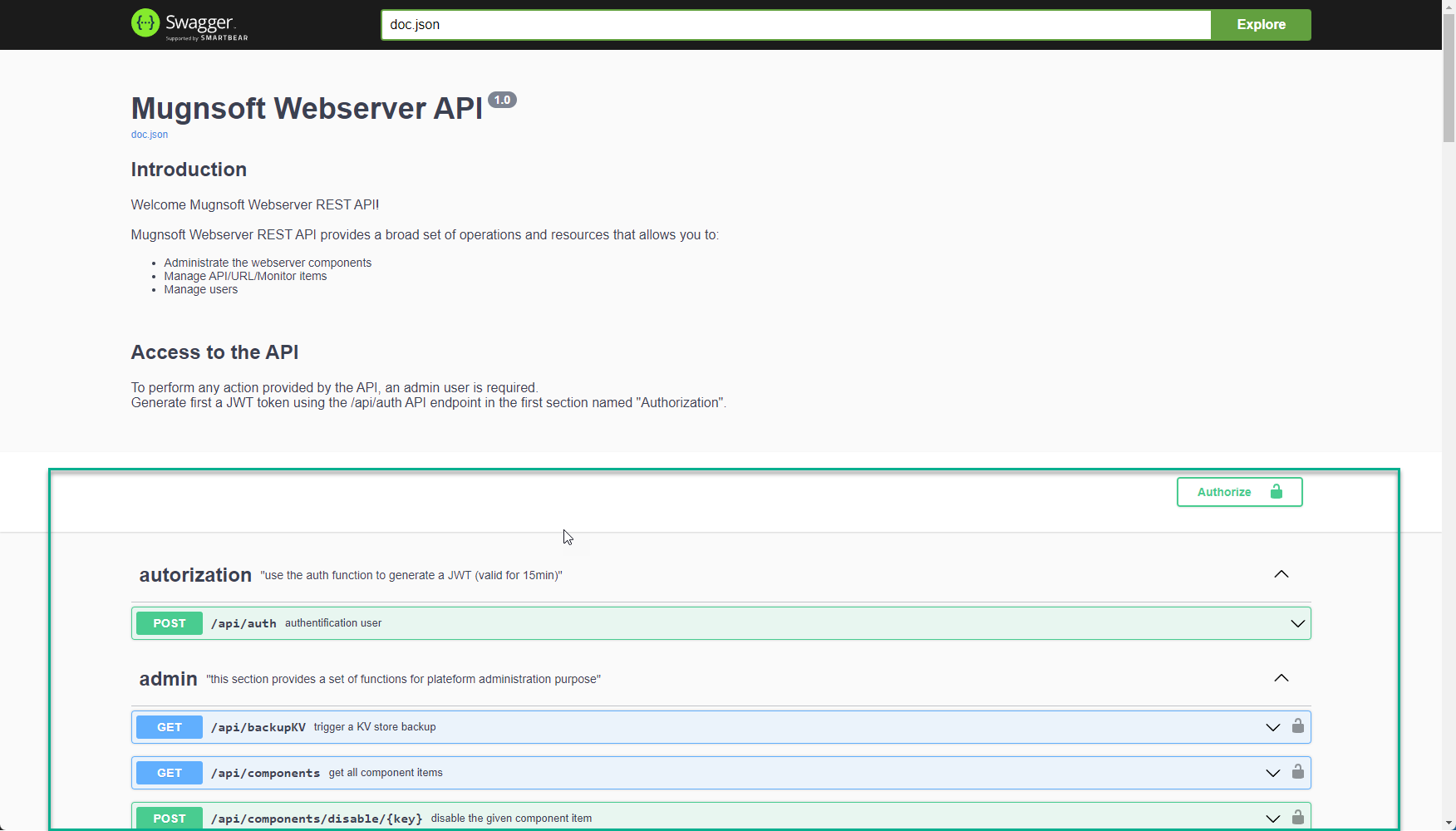
The Webserver exposes a comprehensive REST API on port 8050. All endpoints (except authentication) require a valid JWT Bearer token. Interactive Swagger documentation is available at https://<webserver>:8050/docs/index.html.
Authentication
All API calls require a JWT token obtained from the /api/auth endpoint. Tokens expire after 15 minutes and must be refreshed before expiry.
Get a token
curl -k -X POST https://<webserver>:8050/api/auth \
  -H "Content-Type: application/json" \
  -d '{"username":"admin","password":"yourPassword"}'
Response:
{
  "code": 200,
  "expire": "2026-03-28T12:00:00+01:00",
  "token": "eyJhbGciOiJSUzI1NiIsInR5cCI6IkpXVCJ9..."
}
Use the token
Pass the token in the Authorization header for every subsequent call:
curl -k -X GET https://<webserver>:8050/api/users \
  -H "Authorization: Bearer <token>"
Refresh the token
Call /refresh_token before the current token expires (within 15-minute window):
curl -k -X GET https://<webserver>:8050/refresh_token \
  -H "Authorization: Bearer <token>"
Refresh all component tokens
Force token refresh for all registered components (Monitors, Integrators, etc.):
curl -k -X GET https://<webserver>:8050/refreshTokens \
  -H "Authorization: Bearer <token>"
Using the CA certificate (recommended)
Instead of -k (skip TLS verification), use the Webserver’s CA certificate:
curl --cacert /path/to/webserver/config/ssl/certificates/webserver.crt \
  -X POST https://<webserver>:8050/api/auth \
  -H "Content-Type: application/json" \
  -d '{"username":"admin","password":"yourPassword"}'
Token lifetime summary
| Token type | Validity |
|---|---|
User token (via /api/auth) |
15 minutes |
Component token (via /loginComponent) |
60 days |
Long-lived API key (via /genAPIKey) |
Custom (up to 1 year) |
Health & Status
Public endpoints — no authentication required.
| Method | Endpoint | Description |
|---|---|---|
GET |
/ping |
Liveness check — returns {"message":"pong"} |
GET |
/uptime |
Returns formatted service uptime |
GET |
/api/metrics |
Prometheus-compatible system metrics |
# Liveness check
curl -k https://<webserver>:8050/ping

# Service uptime
curl -k https://<webserver>:8050/uptime
Users
Requires admin group.
| Method | Endpoint | Description |
|---|---|---|
GET |
/api/users |
List all users |
GET |
/api/users/:username |
Get a specific user |
POST |
/api/users |
Create a new user |
PATCH |
/api/users |
Update an existing user |
DELETE |
/api/users/:username |
Delete a user |
Create a user
curl -k -X POST https://<webserver>:8050/api/users \
  -H "Authorization: Bearer <token>" \
  -H "Content-Type: application/json" \
  -d '{
    "name": "jsmith",
    "fullName": "John Smith",
    "email": "jsmith@example.com",
    "password": "SecureP@ss123",
    "accountType": "full",
    "group": "user",
    "enabled": "true",
    "tags": "Production,EU",
    "apps": "App1,App2",
    "maxAppsPerRow": 6,
    "horizontalSpacing": 5,
    "verticalSpacing": 15,
    "darkMode": "false"
  }'
| Field | Type | Required | Description | Values |
|---|---|---|---|---|
name |
string | yes | Login username (alphanumeric only) | |
fullName |
string | no | Display name | |
email |
string | no | Email for alerts and reports | |
password |
string | yes | Plain-text password (hashed server-side with bcrypt) | |
accountType |
string | yes | Account type | full, limited |
group |
string | yes | Permission level | admin, user, viewer |
enabled |
string | yes | Account active state | "true", "false" |
tags |
string | no | Comma-separated tags for data scoping | "Production,EU" |
apps |
string | no | Comma-separated application names for access | "App1,App2" |
maxAppsPerRow |
int | no | Max apps per row in 3D view | Default: 6 |
horizontalSpacing |
int | no | 3D view horizontal spacing | Default: 5 |
verticalSpacing |
int | no | 3D view vertical spacing | Default: 15 |
darkMode |
string | no | Enable dark UI theme | "true", "false" |
Group permissions:
admin— full access, user/settings managementuser— create and manage monitors, reports, downtimes within their tags scopeviewer— read-only access
Update a user
curl -k -X PATCH https://<webserver>:8050/api/users \
  -H "Authorization: Bearer <token>" \
  -H "Content-Type: application/json" \
  -d '{
    "name": "jsmith",
    "group": "admin",
    "enabled": "true",
    "tags": "Production,EU,US",
    "password": "NewP@ss456"
  }'
Settings
Requires admin group.
| Method | Endpoint | Description |
|---|---|---|
GET |
/api/setting |
Get all platform settings |
PATCH |
/api/updateSetting |
Update platform settings |
# Get current settings
curl -k -X GET https://<webserver>:8050/api/setting \
  -H "Authorization: Bearer <token>"
Components
Manage registered Mugnsoft components (Monitor Probes, Integrators, Load Testers, Sentinel Agents).
Status and listing
| Method | Endpoint | Description |
|---|---|---|
GET |
/api/components |
List all registered components |
GET |
/api/components/status |
Status of all enabled/pending components |
GET |
/api/components/status/:key |
Status of a specific component |
# List all components
curl -k -X GET https://<webserver>:8050/api/components \
  -H "Authorization: Bearer <token>"

# Get status of component "probe1"
curl -k -X GET https://<webserver>:8050/api/components/status/probe1 \
  -H "Authorization: Bearer <token>"
Register a component
These endpoints are called automatically by components during self-registration. They can also be called manually via the API.
| Method | Endpoint | Description |
|---|---|---|
POST |
/api/components/probe |
Add a Monitor Probe |
POST |
/api/components/integrator |
Add an Integrator |
POST |
/api/components/loadtest |
Add a Load Tester |
POST |
/api/components/discovery_agent |
Add a Sentinel Agent (discovery_agent type) |
curl -k -X POST https://<webserver>:8050/api/components/probe \
  -H "Authorization: Bearer <token>" \
  -H "Content-Type: application/json" \
  -d '{
    "name": "probe-paris",
    "os": "linux",
    "token": "<component_token>",
    "ip": "10.0.1.10",
    "port": "8072",
    "state": "true",
    "typeServer": "monitor",
    "logLevel": "info",
    "maxBackups": "5",
    "maxSize": "10",
    "maxAge": "28",
    "logCompress": "true",
    "dataRetention": "336",
    "purgeStatusChangeDataNb": "200",
    "concurrencyLimit": "20",
    "nbDaysBackup": "14",
    "backupInterval": "24",
    "chromeBinPath": "",
    "firefoxBinPath": "",
    "edgeBinPath": ""
  }'
Update component settings
| Method | Endpoint | Description |
|---|---|---|
GET |
/api/components/setting/:key |
Get component configuration |
PATCH |
/api/components/setting/probe |
Update Monitor Probe settings |
PATCH |
/api/components/setting/integrator |
Update Integrator settings |
PATCH |
/api/components/setting/loadtest |
Update Load Tester settings |
PATCH |
/api/components/setting/discovery_agent |
Update Sentinel Agent settings |
Enable / Disable / Delete
| Method | Endpoint | Description |
|---|---|---|
POST |
/api/components/disable/:key |
Disable a component |
POST |
/api/components/enable/:key/:componentType |
Enable a component |
DELETE |
/api/components/forceDelete/:key |
Force-delete a component |
# Disable component "probe1"
curl -k -X POST https://<webserver>:8050/api/components/disable/probe1 \
  -H "Authorization: Bearer <token>"

# Enable component "probe1" (type: monitor)
curl -k -X POST https://<webserver>:8050/api/components/enable/probe1/monitor \
  -H "Authorization: Bearer <token>"
Certificate management
| Method | Endpoint | Description |
|---|---|---|
GET |
/api/reloadCertificates |
Reload TLS certificates on Webserver |
GET |
/api/reloadComponentCertificates/:key |
Reload TLS certificates on a component |
URL Monitors
HTTP/HTTPS URL availability and response time checks.
Common operations
| Method | Endpoint | Description |
|---|---|---|
POST |
/api/urls |
Create a new URL monitor |
DELETE |
/api/urls/:key |
Delete a URL monitor |
DELETE |
/api/urls/clean/:key |
Delete historical data only |
DELETE |
/api/urls/ref/:key |
Delete Webserver reference only |
GET |
/api/urls/run/:key |
Trigger an on-demand run |
POST |
/api/urls/disable/:key |
Disable a URL monitor |
POST |
/api/urls/enable/:key |
Enable a URL monitor |
GET |
/api/urls/status |
Get status of all URL monitors |
GET |
/api/urls/details |
Get details of all URL monitors |
GET |
/api/urls/details/:key |
Get details of a specific URL monitor |
GET |
/api/urls/ko |
List all non-OK URL monitors |
GET |
/api/urls/disabled |
List all disabled URL monitors |
Create a URL monitor
curl -k -X POST https://<webserver>:8050/api/urls \
  -H "Authorization: Bearer <token>" \
  -H "Content-Type: application/json" \
  -d '{
    "display_name": "Homepage Check",
    "description": "Monitor the main website homepage",
    "url": "https://www.example.com",
    "probe": "probe-paris",
    "sched": "5MIN",
    "tags": "Production,Web",
    "state": "on",
    "timeout": "30",
    "retries": "2",
    "threshCri": "5000",
    "threshMaj": "3000",
    "threshMin": "1500",
    "certCheck": "on",
    "checkCertExp": "on",
    "nbDaysNotifCert": "30",
    "emailsNotifCert": "ops@example.com",
    "emailOnF": "true",
    "emailR": "ops@example.com",
    "emailOnSC": "true",
    "patternUrl": "Welcome",
    "patternComp": "string =="
  }'
Core fields:
| Field | Required | Description | Example |
|---|---|---|---|
display_name |
yes | Human-readable name | "Homepage Check" |
url |
yes | Target URL | "https://example.com" |
probe |
yes | Probe name(s), comma-separated | "probe1" or "probe1,probe2" |
sched |
yes | Check schedule | "1MIN", "5MIN", "15MIN", "30MIN", "1HOUR" |
schedCron |
no | Custom cron expression (overrides sched) |
"*/10 * * * *" |
description |
no | Free-text description | |
tags |
no | Comma-separated tags | "Production,EU" |
state |
no | Initial state | "on" (default), "off" |
Thresholds (milliseconds):
| Field | Description | Default |
|---|---|---|
timeout |
Request timeout | 30000 |
threshCri |
CRITICAL threshold (ms) | 5000 |
threshMaj |
MAJOR threshold (ms) | 3000 |
threshMin |
MINOR threshold (ms) | 1500 |
retries |
Retries before alerting | 2 |
TLS certificate monitoring:
| Field | Description |
|---|---|
certCheck |
"on" / "off" — validate TLS certificate |
certIssuer |
Expected certificate issuer |
checkCertExp |
"on" / "off" — monitor expiry |
nbDaysNotifCert |
Alert N days before expiry |
emailsNotifCert |
Recipient email for cert alerts |
Content validation:
| Field | Description | Example |
|---|---|---|
patternUrl |
Regex or string to find in response body | "Welcome" |
patternComp |
Comparison operator | "string ==", "string !=", "number <", "number =", "number >" |
pageSizeCheck |
"on" / "off" — check response size |
|
pageSizeComp |
Size comparison operator | "number <" |
pageSize |
Expected page size (bytes) | "10240" |
Authentication:
| Field | Description |
|---|---|
basicAuthUser |
HTTP Basic Auth username |
basicAuthPwd |
HTTP Basic Auth password |
clientCert |
Path to client TLS certificate |
clientCertKey |
Path to client TLS private key |
insecureCert |
true — skip TLS verification (not recommended) |
Proxy:
| Field | Description |
|---|---|
proxyType |
"none", "basic", "auth", "pac" |
proxyHost |
Proxy hostname/IP |
proxyPort |
Proxy port |
proxyUser |
Proxy username |
proxyPwd |
Proxy password |
proxyAutoConfigURL |
PAC file URL |
Alerting (see Common Alert Fields):
Get URL monitor status
# All URL statuses
curl -k -X GET https://<webserver>:8050/api/urls/status \
  -H "Authorization: Bearer <token>"

# Specific monitor
curl -k -X GET https://<webserver>:8050/api/urls/details/homepage-check \
  -H "Authorization: Bearer <token>"

# All non-OK monitors
curl -k -X GET https://<webserver>:8050/api/urls/ko \
  -H "Authorization: Bearer <token>"
API Monitors
REST API endpoint monitoring with custom methods, headers, and body validation.
| Method | Endpoint | Description |
|---|---|---|
POST |
/api/apis |
Create a new API monitor |
DELETE |
/api/apis/:key |
Delete an API monitor |
DELETE |
/api/apis/clean/:key |
Delete historical data only |
DELETE |
/api/apis/ref/:key |
Delete Webserver reference only |
GET |
/api/apis/run/:key |
Trigger an on-demand run |
POST |
/api/apis/disable/:key |
Disable |
POST |
/api/apis/enable/:key |
Enable |
GET |
/api/apis/status |
Status of all API monitors |
GET |
/api/apis/details |
Details of all API monitors |
GET |
/api/apis/details/:key |
Details of a specific API monitor |
GET |
/api/apis/ko |
List all non-OK API monitors |
GET |
/api/apis/disabled |
List all disabled API monitors |
EUM / Browser Monitors
Selenium-based end-user monitoring (browser automation scenarios).
| Method | Endpoint | Description |
|---|---|---|
POST |
/api/monitors |
Create a new EUM monitor (via Swagger — use Web UI for full script upload) |
DELETE |
/api/monitors/:key |
Delete a monitor |
DELETE |
/api/monitors/clean/:key |
Delete historical data only |
DELETE |
/api/monitors/ref/:key |
Delete Webserver reference only |
GET |
/api/monitors/run/:key/:show |
Trigger an on-demand run |
POST |
/api/monitors/stop/:key |
Stop a running monitor |
POST |
/api/monitors/disable/:key |
Disable a monitor |
POST |
/api/monitors/enable/:key |
Enable a monitor |
GET |
/api/monitors/status |
Status of all EUM monitors |
GET |
/api/monitors/details |
Details of all EUM monitors |
GET |
/api/monitors/details/:key |
Details of a specific EUM monitor |
GET |
/api/monitors/ko |
List all non-OK monitors |
GET |
/api/monitors/disabled |
List all disabled monitors |
The :show parameter in the run endpoint controls whether a browser window is displayed during execution (true requires the probe to run as a process, not a service).
# Run EUM monitor headlessly
curl -k -X GET "https://<webserver>:8050/api/monitors/run/my-monitor/false" \
  -H "Authorization: Bearer <token>"

# Stop a running monitor
curl -k -X POST https://<webserver>:8050/api/monitors/stop/my-monitor \
  -H "Authorization: Bearer <token>"
TCP Monitors
TCP port connectivity checks.
| Method | Endpoint | Description |
|---|---|---|
POST |
/api/tcps |
Create a new TCP monitor |
DELETE |
/api/tcps/:key |
Delete |
DELETE |
/api/tcps/clean/:key |
Delete historical data |
DELETE |
/api/tcps/ref/:key |
Delete reference |
GET |
/api/tcps/run/:key |
Trigger on-demand run |
POST |
/api/tcps/disable/:key |
Disable |
POST |
/api/tcps/enable/:key |
Enable |
GET |
/api/tcps/status |
Status of all TCP monitors |
GET |
/api/tcps/details |
Details of all TCP monitors |
GET |
/api/tcps/details/:key |
Details of a specific TCP monitor |
GET |
/api/tcps/ko |
Non-OK TCP monitors |
GET |
/api/tcps/disabled |
Disabled TCP monitors |
Create a TCP monitor
curl -k -X POST https://<webserver>:8050/api/tcps \
  -H "Authorization: Bearer <token>" \
  -H "Content-Type: application/json" \
  -d '{
    "display_name": "Redis Port 6379",
    "description": "Check Redis TCP port",
    "destIp": "10.0.1.20",
    "destPort": "6379",
    "probe": "probe-paris",
    "sched": "1MIN",
    "tags": "Production,Cache",
    "state": "on",
    "timeout": "5000",
    "retries": "2",
    "threshCri": "1000",
    "threshMaj": "500",
    "threshMin": "200",
    "emailOnF": "true",
    "emailR": "ops@example.com"
  }'
| Field | Required | Description | Example |
|---|---|---|---|
display_name |
yes | Human-readable name | "Redis Port 6379" |
destIp |
yes | Target IP or hostname | "10.0.1.20" |
destPort |
yes | Target TCP port | "6379" |
srcIp |
no | Source IP to bind to | "10.0.0.1" |
probe |
yes | Probe name(s) | "probe1" |
sched |
yes | Check schedule | "1MIN" |
timeout |
no | Connection timeout (ms) | "5000" |
threshCri |
no | CRITICAL threshold (ms) | "1000" |
threshMaj |
no | MAJOR threshold (ms) | "500" |
threshMin |
no | MINOR threshold (ms) | "200" |
retries |
no | Retries before alerting | "2" |
Ping Monitors
ICMP ping checks (latency, jitter, packet loss).
| Method | Endpoint | Description |
|---|---|---|
POST |
/api/pings |
Create a new Ping monitor |
DELETE |
/api/pings/:key |
Delete |
GET |
/api/pings/run/:key |
Trigger on-demand run |
POST |
/api/pings/disable/:key |
Disable |
POST |
/api/pings/enable/:key |
Enable |
GET |
/api/pings/status |
Status of all Ping monitors |
GET |
/api/pings/details |
Details of all Ping monitors |
GET |
/api/pings/details/:key |
Details of a specific Ping monitor |
GET |
/api/pings/ko |
Non-OK Ping monitors |
GET |
/api/pings/disabled |
Disabled Ping monitors |
Create a Ping monitor
curl -k -X POST https://<webserver>:8050/api/pings \
  -H "Authorization: Bearer <token>" \
  -H "Content-Type: application/json" \
  -d '{
    "display_name": "Gateway Ping",
    "destIp": "10.0.0.1",
    "count": "5",
    "probe": "probe-paris",
    "sched": "1MIN",
    "tags": "Production,Network",
    "state": "on",
    "timeout": "5000",
    "retries": "2",
    "threshCri": "500",
    "threshMaj": "200",
    "threshMin": "100",
    "jitterThreshCri": "100000",
    "jitterThreshMaj": "50000",
    "jitterThreshMin": "20000",
    "emailOnF": "true",
    "emailR": "ops@example.com"
  }'
| Field | Required | Description | Example |
|---|---|---|---|
display_name |
yes | Human-readable name | "Gateway Ping" |
destIp |
yes | Target IP or hostname | "10.0.0.1" |
srcIp |
no | Source IP | |
count |
no | Number of ICMP packets | "5" |
probe |
yes | Probe name(s) | "probe1" |
sched |
yes | Check schedule | "1MIN" |
timeout |
no | Timeout (ms) | "5000" |
threshCri |
no | Latency CRITICAL threshold (ms) | "500" |
threshMaj |
no | Latency MAJOR threshold (ms) | "200" |
threshMin |
no | Latency MINOR threshold (ms) | "100" |
jitterThreshCri |
no | Jitter CRITICAL threshold (µs) | "100000" |
jitterThreshMaj |
no | Jitter MAJOR threshold (µs) | "50000" |
jitterThreshMin |
no | Jitter MINOR threshold (µs) | "20000" |
DNS Monitors
DNS resolution checks (nslookup).
| Method | Endpoint | Description |
|---|---|---|
POST |
/api/nslookups |
Create a new DNS monitor |
DELETE |
/api/nslookups/:key |
Delete |
GET |
/api/nslookups/run/:key |
Trigger on-demand run |
POST |
/api/nslookups/disable/:key |
Disable |
POST |
/api/nslookups/enable/:key |
Enable |
GET |
/api/nslookups/status |
Status of all DNS monitors |
GET |
/api/nslookups/details |
Details of all DNS monitors |
GET |
/api/nslookups/details/:key |
Details of a specific DNS monitor |
GET |
/api/nslookups/ko |
Non-OK DNS monitors |
GET |
/api/nslookups/disabled |
Disabled DNS monitors |
Create a DNS monitor
curl -k -X POST https://<webserver>:8050/api/nslookups \
  -H "Authorization: Bearer <token>" \
  -H "Content-Type: application/json" \
  -d '{
    "display_name": "DNS Check example.com",
    "lookupName": "example.com",
    "probe": "probe-paris",
    "sched": "5MIN",
    "tags": "Production,DNS",
    "state": "on",
    "timeout": "5000",
    "retries": "2",
    "threshCri": "2000",
    "threshMaj": "1000",
    "threshMin": "500",
    "emailOnF": "true",
    "emailR": "ops@example.com"
  }'
Database Monitors
SQL query execution and result validation (MySQL, MSSQL).
| Method | Endpoint | Description |
|---|---|---|
POST |
/api/dbs |
Create a new DB monitor |
DELETE |
/api/dbs/:key |
Delete |
GET |
/api/dbs/run/:key |
Trigger on-demand run |
POST |
/api/dbs/disable/:key |
Disable |
POST |
/api/dbs/enable/:key |
Enable |
GET |
/api/dbs/status |
Status of all DB monitors |
GET |
/api/dbs/details |
Details of all DB monitors |
GET |
/api/dbs/details/:key |
Details of a specific DB monitor |
GET |
/api/dbs/ko |
Non-OK DB monitors |
GET |
/api/dbs/disabled |
Disabled DB monitors |
SNMP Monitors
SNMP OID polling and threshold evaluation.
| Method | Endpoint | Description |
|---|---|---|
POST |
/api/snmps |
Create a new SNMP monitor |
DELETE |
/api/snmps/:key |
Delete |
GET |
/api/snmps/run/:key |
Trigger on-demand run |
POST |
/api/snmps/disable/:key |
Disable |
POST |
/api/snmps/enable/:key |
Enable |
GET |
/api/snmps/status |
Status of all SNMP monitors |
GET |
/api/snmps/details |
Details of all SNMP monitors |
GET |
/api/snmps/details/:key |
Details of a specific SNMP monitor |
GET |
/api/snmps/ko |
Non-OK SNMP monitors |
GET |
/api/snmps/disabled |
Disabled SNMP monitors |
System Monitors
Probe self-monitoring: CPU, memory, and disk usage of the probe host.
| Method | Endpoint | Description |
|---|---|---|
POST |
/api/syss |
Create a new System monitor |
DELETE |
/api/syss/:key |
Delete |
GET |
/api/syss/run/:key |
Trigger on-demand run |
POST |
/api/syss/disable/:key |
Disable |
POST |
/api/syss/enable/:key |
Enable |
GET |
/api/syss/status |
Status of all System monitors |
GET |
/api/syss/details |
Details of all System monitors |
GET |
/api/syss/details/:key |
Details of a specific System monitor |
GET |
/api/syss/ko |
Non-OK System monitors |
GET |
/api/syss/disabled |
Disabled System monitors |
Applications
Group monitors into logical applications with aggregated status and topology views.
| Method | Endpoint | Description |
|---|---|---|
POST |
/api/apps |
Create a new application |
DELETE |
/api/apps/:key |
Delete an application |
DELETE |
/api/apps/clean/:key |
Delete historical data |
DELETE |
/api/apps/ref/:key |
Delete reference |
POST |
/api/apps/disable/:key |
Disable |
POST |
/api/apps/enable/:key |
Enable |
GET |
/api/apps/status |
Status of all applications |
GET |
/api/apps/details/:key |
Details of a specific application |
Create an application
curl -k -X POST https://<webserver>:8050/api/apps \
  -H "Authorization: Bearer <token>" \
  -H "Content-Type: application/json" \
  -d '{
    "name": "ecommerce-prod",
    "display_name": "E-Commerce Production",
    "description": "All production e-commerce monitors",
    "tags": "Production,Ecommerce",
    "apps": "Checkout,Catalog,Payment",
    "bRule": "or",
    "threshCri": "1",
    "threshMaj": "2",
    "threshMin": "3",
    "state": "on",
    "emailOnF": "true",
    "emailR": "ops@example.com",
    "emailOnSC": "true"
  }'
Reports
Generate and send performance reports.
| Method | Endpoint | Description |
|---|---|---|
POST |
/genAndSendReport |
Generate and send a specific report |
POST |
/genAndSendReportAll |
Generate and send all reports |
POST |
/genAndSendReportUrl |
Generate and send a URL monitor report |
POST |
/genAndSendReportApi |
Generate and send an API monitor report |
POST |
/genAndSendReportTcp |
Generate and send a TCP monitor report |
POST |
/genAndSendReportPing |
Generate and send a Ping monitor report |
POST |
/genAndSendInfraReport |
Generate and send an infrastructure report |
# Generate and send report by key
curl -k -X POST https://<webserver>:8050/genAndSendReport \
  -H "Authorization: Bearer <token>" \
  -H "Content-Type: application/json" \
  -d '{"key": "weekly-perf-report"}'
Downtimes
Create planned maintenance windows to suppress alerting.
| Method | Endpoint | Description |
|---|---|---|
POST |
/downtime/create |
Create a downtime |
POST |
/downtime/update/:key |
Update a downtime |
DELETE |
/downtime/delete/:key |
Delete a downtime |
GET |
/downtime/detail/:key |
Get a specific downtime |
GET |
/downtime/details |
List all downtimes with details |
GET |
/downtime/some/:tags |
List downtimes for given tags |
GET |
/downtime/cronjobs |
List downtime cron schedules |
# Create a downtime window
curl -k -X POST https://<webserver>:8050/downtime/create \
  -H "Authorization: Bearer <token>" \
  -H "Content-Type: application/json" \
  -d '{
    "name": "weekly-maintenance",
    "display_name": "Weekly Maintenance Window",
    "tags": "Production",
    "sched": "0 2 * * 0",
    "duration": "120",
    "state": "on"
  }'
API Keys & Token Management
Generate long-lived API keys for automation and CI/CD integration.
| Method | Endpoint | Description |
|---|---|---|
GET |
/apiKeys |
List all API keys |
POST |
/genAPIKey |
Generate a custom API key with configurable TTL |
POST |
/genAPIKeyComponent |
Generate an API key for a component |
POST |
/revokeAPIKey |
Revoke an API key |
GET |
/getComponentToken |
Get the current component JWT token |
GET |
/gettoken |
Get current user token details |
# Generate a 1-year API key
curl -k -X POST https://<webserver>:8050/genAPIKey \
  -H "Authorization: Bearer <token>" \
  -H "Content-Type: application/json" \
  -d '{
    "name": "cicd-pipeline",
    "ttl": "8760",
    "group": "admin"
  }'

# Revoke an API key
curl -k -X POST https://<webserver>:8050/revokeAPIKey \
  -H "Authorization: Bearer <token>" \
  -H "Content-Type: application/json" \
  -d '{"key": "cicd-pipeline"}'
Hosts
Manage monitored hosts with SSH-based instrumentation file distribution.
| Method | Endpoint | Description |
|---|---|---|
GET |
/hosts |
List all hosts |
POST |
/addHost |
Add a host |
POST |
/updateHost |
Update a host |
DELETE |
/host/:probe/:key |
Delete a host |
GET |
/getHostDetails/:key |
Get host details |
GET |
/hostsList |
Flat list of all hosts |
GET |
/hostsList/:probe |
Hosts registered to a specific probe |
POST |
/sendInstrumFiles/:key |
Push instrumentation files via SSH/SFTP |
Devices (SNMP)
Manage SNMP-monitored devices.
| Method | Endpoint | Description |
|---|---|---|
GET |
/devices |
List all SNMP devices |
POST |
/addDevice |
Add a device |
POST |
/updateDevice |
Update a device |
DELETE |
/device/:probe/:key |
Delete a device |
GET |
/getDeviceDetails/:key |
Get device details |
POST |
/device/testsnmp |
Test SNMP connectivity to a device |
POST |
/device/testoid |
Test a specific OID on a device |
Database Operations
Low-level KV store operations. Requires admin group.
| Method | Endpoint | Description |
|---|---|---|
GET |
/api/backupKV |
Trigger a KV store backup |
GET |
/api/reinitKV |
Reinitialize the KV store (⚠ destructive) |
POST |
/backupDatabase |
Backup the Webserver KV store |
POST |
/backupDatabase/:key |
Backup a specific component’s KV store |
POST |
/reinitDatabase/:svrType/:key |
Reinitialize a component’s KV store (⚠ destructive) |
GET |
/webserver/:bucket/allV |
Get all values from a bucket |
GET |
/webserver/:bucket/allK |
Get all keys from a bucket |
GET |
/webserver/:bucket/allKV |
Get all key-value pairs from a bucket |
/reinitKV and /reinitDatabase endpoints permanently delete all data in the target KV store. Always take a backup first with /backupKV or /backupDatabase.
# Backup the Webserver KV store
curl -k -X POST https://<webserver>:8050/backupDatabase \
  -H "Authorization: Bearer <token>"

# Backup probe "probe1" KV store
curl -k -X POST https://<webserver>:8050/backupDatabase/probe1 \
  -H "Authorization: Bearer <token>"

# List all keys in the "user" bucket
curl -k -X GET https://<webserver>:8050/webserver/user/allK \
  -H "Authorization: Bearer <token>"
Common Alert Fields
All monitor types (URL, API, TCP, Ping, DNS, DB, SNMP, EUM) share the same alerting fields:
Notification conditions:
| Field | Description | Example |
|---|---|---|
notifyStatus |
Minimum status that triggers alerts | "MINOR", "MAJOR", "CRITICAL" |
notifyAfter |
Alert after N consecutive failures | "3" |
notifyFor |
Continue alerting for N cycles after breach | "5" |
retries |
Number of retries before alerting | "2" |
Email alerts:
| Field | Description |
|---|---|
emailOnF |
"true" — send email on failure |
emailOnSC |
"true" — send email on status change |
emailR |
Recipient email address(es), comma-separated |
Slack alerts:
| Field | Description |
|---|---|
slackOnF |
"true" — post to Slack on failure |
slackOnSC |
"true" — post to Slack on status change |
slackChan |
Slack channel (overrides global setting) |
slackTok |
Slack bot token (overrides global setting) |
Microsoft Teams alerts:
| Field | Description |
|---|---|
teamsOnF |
"true" — post to Teams on failure |
teamsOnSC |
"true" — post to Teams on status change |
teamsWH |
Teams webhook URL |
PagerDuty alerts:
| Field | Description |
|---|---|
pdOnF |
"true" — trigger PagerDuty on failure |
pdOnSC |
"true" — trigger PagerDuty on status change |
pdAPI |
PagerDuty API integration key |
Custom script actions:
| Field | Description |
|---|---|
scriptOnF |
Script path to execute on failure |
scriptOnSC |
Script path to execute on status change |
scriptAction |
Script action content |
scriptActionT |
Script action type |
Common Schedule Values
The sched field accepts the following values:
| Value | Description |
|---|---|
1MIN |
Every 1 minute |
5MIN |
Every 5 minutes |
15MIN |
Every 15 minutes |
30MIN |
Every 30 minutes |
1HOUR |
Every hour |
6HOUR |
Every 6 hours |
12HOUR |
Every 12 hours |
1DAY |
Once a day |
CRON |
Custom cron expression (set schedCron) |
When using CRON, set sched to "CRON" and provide a standard cron expression in schedCron:
"sched": "CRON",
"schedCron": "0 8 * * 1-5"
Status Codes
All API responses include a numeric code field:
| Code | Meaning |
|---|---|
200 |
Success |
400 |
Bad request — missing or invalid parameters |
401 |
Unauthorized — expired token, wrong credentials, or insufficient group |
404 |
Not found |
429 |
Too many login attempts — IP locked out for 5 minutes |
500 |
Internal server error |
Monitor status values returned by status endpoints:
| Status | Color | Meaning |
|---|---|---|
OK |
Green | All checks passing within thresholds |
MINOR |
Yellow | Response time above MINOR threshold |
MAJOR |
Orange | Response time above MAJOR threshold |
CRITICAL |
Red | Response time above CRITICAL threshold |
ERROR |
Red | Check failed (connection refused, timeout) |
DOWN |
Gray | Monitor disabled or probe unreachable |
Predictions
Response-time forecasts, model training and the link to the prediction service (administrators). See Predictive analytics.
| Method | Endpoint | Description |
|---|---|---|
GET |
/predictions |
Every stored forecast with model and alert state (?monitor=<key> for one) |
GET |
/prediction/:type/:key |
One monitor’s forecast, e.g. /prediction/url/shop_probe1 |
POST |
/runPredictions |
Refresh the monitor list and forecast every enabled monitor now |
POST |
/trainPrediction |
Train one monitor now: {"type":"url","key":"shop_probe1"} |
GET |
/predictionSettings |
Get prediction settings (secrets masked) |
POST |
/updatePredictionSettings |
Update prediction settings |
GET |
/predictionHealth |
Reachability and authentication check of the prediction service |
GET |
/predictionPublicKey |
Public signing key(s) to install on the prediction service |
POST |
/predictionRotateKey |
Rotate the signing key |
POST |
/predictionFetchCert |
Read a prediction service’s TLS certificate: {"url":"https://host:8000"} |
Swagger UI
The full interactive API reference is available at:
https://<webserver>:8050/docs/index.html
The Swagger UI lets you explore all endpoints, inspect request/response schemas, and execute calls directly from the browser using a valid JWT token.
Quick Reference: Shell Script Template
Use this template to build automation scripts against the Webserver API:
#!/bin/bash
WEBSERVER="https://webserver.example.com:8050"
CACERT="/path/to/webserver.crt"  # or use -k for testing

# 1. Authenticate
TOKEN=$(curl -s --cacert "$CACERT" -X POST "$WEBSERVER/api/auth" \
  -H "Content-Type: application/json" \
  -d '{"username":"admin","password":"yourPassword"}' \
  | jq -r '.token')

if [ -z "$TOKEN" ] || [ "$TOKEN" = "null" ]; then
  echo "Authentication failed"
  exit 1
fi

# 2. Make API calls
curl -s --cacert "$CACERT" -X GET "$WEBSERVER/api/urls/status" \
  -H "Authorization: Bearer $TOKEN" \
  | jq .

# 3. Get all non-OK monitors across all types
for TYPE in urls apis monitors tcps pings nslookups dbs snmps syss; do
  echo "=== NON-OK $TYPE ==="
  curl -s --cacert "$CACERT" -X GET "$WEBSERVER/api/$TYPE/ko" \
    -H "Authorization: Bearer $TOKEN" \
    | jq .
done
See also
- Create API Tokens — generate long-lived API tokens for CI/CD
- Webserver Component — architecture, startup, and service management
- Webserver Configuration — complete settings reference
- Monitor HTTP API — Monitor Probe API reference
- Integrator HTTP API — Integrator API reference