Integration with InfluxDB
For this integration, we will utilize InfluxDB’s HTTP/HTTPS EndPoint.
The initial configuration involves setting up InfluxDB to receive JSON data from the Mugnsoft Integrator. It’s worth noting that authentication for InfluxDB’s endpoint is optional, and creating a user is also at your discretion.
Note:
Please for more details refer to https://docs.influxdata.com/influxdb/v1.7/administration/authentication_and_authorization/#authorization
We assume that there is no firewall rule preventing Mugnsoft integrator to communicate with InfluxDB HTTP/HTTPS EndPoint. We assume that you have the right credentials to perform InfluxDB HTTP/HTTPS EndPoint configuration.
Configure Mugnsoft’s integration with InfluxDBv1.x
Create a influxDB user (optional)
$ influx -ssl -unsafeSsl
Connected to https://localhost:8086 version 1.7.9
InfluxDB shell version: 1.7.9
> create user Mugnsoft_user with password 'secret' with all privileges;
> show users
user          admin
----          -----
Mugnsoft_user true
> show databases;
name: databases
name
----
_internal
>
Note:
Enable InfluxDB http endpoint with user authentification (optional)
To enable http with user authentification by updating influxDB config file influxdb.conf:
[http]
  auth-enabled = true
Note:
This step is optional you can leave the default setting false. This means that you can connect to the InfluxDB endpoint without user and password.
Restart your influxDB instance.
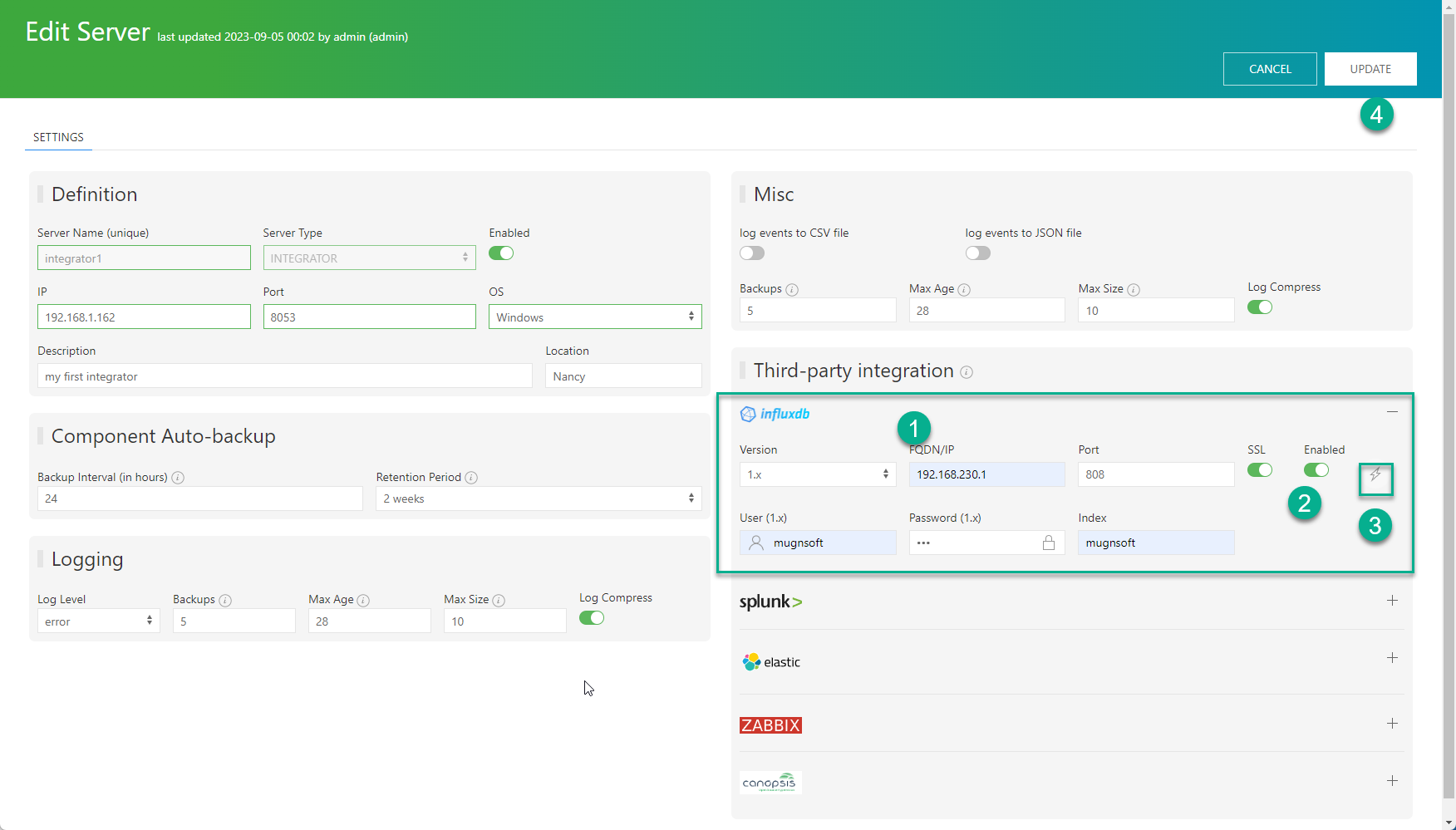
Add/Update the Mugnsoft integrator with InfluxDB info
Open gear menu → components, right-click the Integrator node and choose edit server. In the External Integration tab, click the InfluxDB tile and fill in your InfluxDB connection. Switch the InfluxDB tile on, test the connection with ⚡, then save with the disk icon.
Check your InfluxDB’s Search & Reporting dashboard
You should see a database called Mugnsoft in InfluxDB.
> show databases
name: databases
name
----
_internal
Mugnsoft
Check you InfluxDB database “Mugnsoft”
You will start receiving some events in InfluxDB.
> use Mugnsoft
> show measurements
name: measurements
name
----
ScenarioResponseTime
ScenarioTransResponseTime
> show series
key
---
ScenarioResponseTime,location=Paris,name=indeed2_probe1,status=OK
ScenarioResponseTime,location=Paris,name=indeed3_probe1,status=OK
ScenarioResponseTime,location=onDemand,name=my_awesome_website_probe1,status=OK
ScenarioResponseTime,location=onDemand,name=indeed3_probe1,status=OK
ScenarioTransResponseTime,location=Paris,name=my_awesome_website_probe1,status=OK,transactionName=1.\ go-url
ScenarioTransResponseTime,location=Paris,name=my_awesome_website_probe1,status=OK,transactionName=2.\ fetch-profile
ScenarioTransResponseTime,location=Paris,name=my_awesome_website_probe1,status=OK,transactionName=3.\ fetch-data
ScenarioTransResponseTime,location=Paris,name=my_awesome_website_probe1,status=OK,transactionName=4.\ log-out
ScenarioTransResponseTime,location=Paris,name=indeed2_probe1,status=OK,transactionName=1.\ go-url
ScenarioTransResponseTime,location=Paris,name=indeed2_probe1,status=OK,transactionName=2.\ input-what
ScenarioTransResponseTime,location=Paris,name=indeed2_probe1,status=OK,transactionName=3.\ input-where
ScenarioTransResponseTime,location=Paris,name=indeed2_probe1,status=OK,transactionName=4.\ button
ScenarioTransResponseTime,location=Paris,name=indeed3_probe1,status=OK,transactionName=1.\ go-url
ScenarioTransResponseTime,location=Paris,name=indeed3_probe1,status=OK,transactionName=2.\ input-what
ScenarioTransResponseTime,location=Paris,name=indeed3_probe1,status=OK,transactionName=3.\ input-where
ScenarioTransResponseTime,location=Paris,name=indeed3_probe1,status=OK,transactionName=4.\ button
Disable the Mugnsoft/InfluxDB integration
If you want to stop sending the monitors’ data to InfluxDB. Edit the integrator component and uncheck the “Enabled” checkbox.
See also
- Integrator Component — worker pool architecture, all integration types, and alerting
- Integrator Configuration — InfluxDB v1/v2/v3 settings reference
- Displaying Data in Grafana — visualize InfluxDB data with Grafana dashboards
- Integration Prerequisites — common requirements for all integrations