ON FAIL and ON CHANGE
Every channel has two triggers. ON FAIL alerts while a monitor stays in a bad status. ON CHANGE alerts each time its status changes. They are independent: switch on one, the other, or both.
The ON FAIL rule
The rule is the bar at the top of the monitor’s Actions tab. It is shared by every channel whose On fail switch is on.

| Field | Values | Default | Meaning |
|---|---|---|---|
| notify if status is … or worse | minor, major, critical, error | critical | The lowest status that counts as a failure. |
| after x checks | 1 to 10 | 3 | How many earlier checks must also have failed. |
| for x checks | 0 to 100 (0 = unlimited) | 0 | How many alerts to send for one failure episode. |
Which statuses count
Statuses are ranked from best to worst. A check counts as failed when its status is at or above the chosen level:
| Rank | Statuses |
|---|---|
| 0 | OK, UNKNOWN |
| 1 | MINOR |
| 2 | MAJOR |
| 3 | CRITICAL |
| 4 | ERROR, TIMEOUT, EXCEPTION, CONFIG |
So critical or worse also fires on ERROR, TIMEOUT, EXCEPTION and CONFIG, and error fires on all four of them. Different bad statuses in a row still count as one run of failures: MAJOR, CRITICAL, MAJOR is three failed checks for a major or worse rule.
When it fires
After each check, the probe looks at this check and the x checks before it (x = after x checks). If all of them failed, the alert is sent. In other words, with after x checks = x, the first alert goes out on the (x+1)th consecutive failed check: with the default 3, on the 4th.
Repeated failures
While the monitor keeps failing, the rule is evaluated again at every check:
- for 0 checks (default): an alert at every check, for as long as the failure lasts. With a 1-minute schedule, that is one alert per minute.
- for N checks: N alerts, on N consecutive checks, then silence until the monitor recovers.
Recovery
ON FAIL never sends anything when a monitor recovers: an OK check does not meet the rule. It does reset the count: the next failure starts a new episode, waits again for after x checks, and sends up to for x checks alerts again.
To be told about the recovery, switch On change on as well. Two exceptions: PagerDuty and SIGNL4. When their On fail trigger is on, the recovery still sends a resolve, so the incident or alert ON FAIL opened is closed even with On change off (see PagerDuty and SIGNL4).
A worked example
Rule: critical or worse, after 1 check, for 3 checks, schedule every minute.
| Check | Status | Failed checks in a row | ON FAIL | ON CHANGE |
|---|---|---|---|---|
| 10:00 | OK | 0 | — | — |
| 10:01 | CRITICAL | 1 | — (needs 2) | sent (OK → CRITICAL) |
| 10:02 | CRITICAL | 2 | sent (1st) | — |
| 10:03 | ERROR | 3 | sent (2nd) | sent (CRITICAL → ERROR) |
| 10:04 | ERROR | 4 | sent (3rd) | — |
| 10:05 | ERROR | 5 | — (3 sent) | — |
| 10:06 | OK | 0 | — | sent (ERROR → OK, “RESOLVED”) |
| 10:07 | CRITICAL | 1 | — (new episode) | sent |
With for 0 checks, ON FAIL would also have fired at 10:05 and at every later failed check.
The ON CHANGE trigger
ON CHANGE alerts on every status change, whatever its severity: OK → MINOR, MAJOR → CRITICAL, CRITICAL → OK… The ON FAIL rule (level, after, for) does not apply to it. A recovery alert reads [RESOLVED] <monitor> is back to OK. The first status of a new monitor is not a change: ON CHANGE starts with its second status.
Debounce
A monitor that flaps (one timeout, then OK) produces two changes, so two ON CHANGE alerts. The probe setting Debounce status-change alerts holds a change back until the new status has lasted after x checks + 1 consecutive checks (x taken from each monitor’s ON FAIL rule). A change that does not last that long is never notified; one that does is notified on the check where it becomes stable.
Open gear menu → components, right-click the probe, edit server, block Auto baselining:
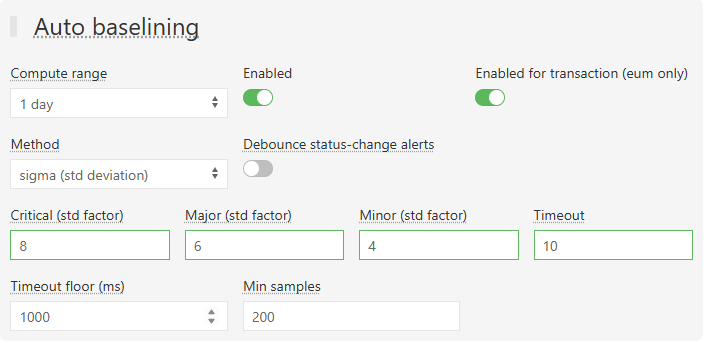
Debounce applies to every monitor of that probe, and only to the notifications: the status, the reports and the ITSM tickets (ServiceNow, GLPI, Jira) still follow every change.
Choosing the triggers
| You want | On fail | On change | Rule |
|---|---|---|---|
| A page when something is down, not for every blip | on | off | error, after 2–3, for 1 |
| A reminder while it stays down | on | off | after 3, for 0 (every check) or for N |
| To know when it starts and when it ends | off | on | — (turn on debounce against flapping) |
| An incident tool that opens and closes incidents (PagerDuty, SIGNL4) | on | optional | the recovery resolves the incident either way |
| A remediation script run once per incident | on | off | after x, for 1 |
Both triggers must be on twice
A trigger works only if it is switched on on the monitor and on its Integrator (Integrator → Notifications). The Integrator switch is shared by every monitor routed through it: switching On change off there silences ON CHANGE for all of them. See How an alert reaches someone.
Related
- Thresholds: how a measurement becomes MINOR, MAJOR or CRITICAL.
- Downtime operations: silence alerts during planned work.
- Troubleshooting: when an expected alert does not arrive.